Location is one of the most useful permissions on a smartphone—and one of the most revealing. An app that knows your precise position can help find a nearby restaurant, tag a photo or confirm a delivery address. The trouble is that many of these tasks need your location for only a moment, while traditional permission choices can leave the door open much longer.
Android 17 addresses that mismatch with a new system-rendered location button. It lets an app request precise location for the current session, giving it the information needed for a specific task without creating ongoing access. The result is a permission that behaves more like a deliberate action than a standing agreement.
It is a small interface change with a larger principle behind it: apps should receive sensitive information only when they need it, for as long as they need it.
A Smaller Permission for a Smaller Job
Many location requests are temporary by nature. A shopping app may need your position to locate the nearest store. A social platform may use it to tag a post. A delivery service might need it once to fill in an address. None of these actions automatically justify continued access after the task is complete.
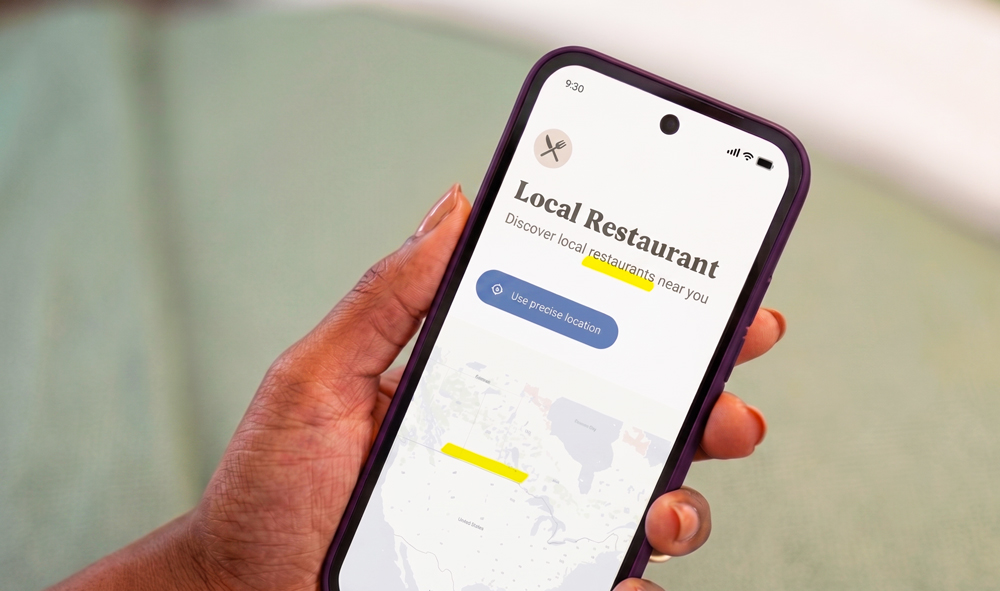
Android’s location button is designed specifically for these short interactions. When an app includes the button, it can be labelled with options such as “Use precise location” or “Share precise location.” Tapping it grants precise location access for the active session while the app is open.
Once that session ends, the app no longer holds the same permission for future use. If it needs your precise location again, you must take another intentional action. That turns location sharing into something closer to pressing “attach photo” or “share contact” rather than signing an open-ended privacy contract.
How It Differs From “Only This Time”
Android has offered an “Only this time” permission since Android 11, covering location, the camera and the microphone. It was an important improvement, but it still relies on the standard permission dialog and can lead to repeated prompts whenever an app needs temporary access again.
The Android 17 location button moves the decision into the feature itself. Instead of an app interrupting you with a broad permission request, the location control appears where the information is actually useful. You might see it beside a “find stores near me” search or on a screen for adding a location to a post.
That context makes the request easier to understand. You know what you are trying to do, why the app needs your position and when access is being activated. It also helps prevent the familiar habit of tapping “Allow” simply to dismiss a pop-up and continue.
Precise Location Without a Permanent Pass
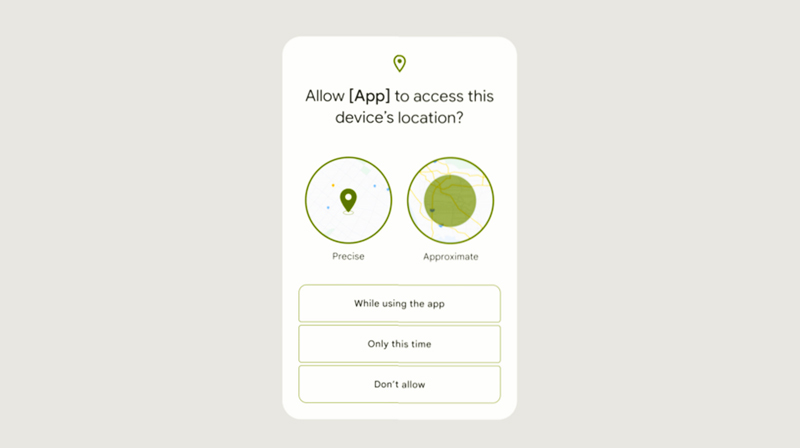
Android already lets users choose between approximate and precise location. Approximate access can be enough for weather, regional content or a general local search, while precise access may reveal the device’s position closely enough for navigation, pickup coordination or address confirmation.
The new location button is intended for moments when approximate information is not sufficient but persistent precise access would be excessive. Developers can configure their apps so that precise location is available only through this system-controlled button. The app cannot quietly turn that limited interaction into a broader permission request through the same route.
This approach does not eliminate normal location permissions. Navigation, fitness tracking, emergency services and other genuinely continuous features may still require location throughout an activity—or, in more limited cases, while operating in the background. Android is instead separating those ongoing needs from quick actions that require only a single location check.
Android Makes Location Use More Visible
Temporary access is only one part of Android 17’s location privacy update. The system also introduces a more persistent on-screen indicator when a non-system app is using location, bringing the experience closer to Android’s camera and microphone indicators.
Users can tap the indicator to view recently active apps and move directly into permission controls. This reduces the distance between noticing location use and doing something about it. If an app appears unexpectedly, its access can be reviewed without digging through several layers of Settings.
Android 17 also improves approximate location in sparsely populated regions. Earlier versions used a largely fixed geographic grid, which could still reveal too much in an area containing very few people. The newer system adjusts the approximate area according to population density, expanding it where necessary to provide more consistent privacy.
Developers Will Have to Adopt It
The location button is not automatically inserted into every Android app. Developers must add it to their interfaces, and users will see it only in apps that support the new system.
Google is giving developers a Jetpack library that provides the button and handles compatibility with older Android versions. On Android 16 and earlier, the same interface can fall back to the existing location permission process. This should make adoption easier without requiring companies to maintain completely separate designs.
Google Play is also applying pressure beyond friendly encouragement. Under a policy scheduled to take effect on January 27, 2027, apps targeting Android 17 or later that need precise location only for one-time, user-initiated actions will generally be required to use the location button. Developers seeking broader precise access will have to show why temporary access or approximate location cannot support the app’s core function.
That policy could matter more than the feature itself. Privacy controls are useful only when apps implement them, and store requirements give developers a reason to redesign permission flows instead of continuing to request the widest access available.
What Users Should Expect

The most noticeable change should be fewer unnecessary location prompts. Instead of deciding whether an unfamiliar app deserves ongoing access, users can share a precise position only when pressing a clearly marked control.
There will still be reasons to check Android’s permission dashboard. Temporary access limits when an app can obtain location, but it does not determine everything the company may do with information already submitted during that session. An app could still store a delivery address, attach a location to a post or retain data according to its disclosed policies. Temporary permission is a limit on access, not an automatic delete button.
Adoption will also take time. Android 17 is available on supported Pixel devices, but manufacturers follow different update schedules, and individual apps must incorporate the new button. The change will therefore appear gradually rather than transforming every location request overnight.
Final Byte
Android’s new location button makes a simple argument: using your position once should not require handing it over indefinitely. By tying precise access to a visible action and an active session, Android 17 gives apps enough information to complete the task without granting them unnecessary time with the data.
It will not solve every concern surrounding location collection, but it improves the moment where privacy decisions are made. Less access, clearer intent and fewer permission pop-ups—that is the rare update that benefits users without making the phone harder to use.