Android updates no longer arrive with the visual shock they once did. The operating system is mature, phone makers add their own interfaces, and many new capabilities appear gradually through app updates rather than one dramatic overnight transformation. Android 17 follows that pattern, but beneath its familiar surface are several changes that can meaningfully alter how a phone fits into daily life.
Released in June 2026 and initially made available to most supported Pixel devices, Android 17 concentrates on multitasking, cross-device continuity, privacy and more adaptable apps. Some of its most ambitious ideas still require developers and manufacturers to participate, but the useful parts are refreshingly practical. This is less about a new coat of paint and more about removing small annoyances that have survived far too many versions.
Any App Can Become a Floating Bubble
The most immediately visible change is App Bubbles. Android has supported floating bubbles for conversations for years, but Android 17 expands the idea beyond messaging. A long press on an app icon can now turn the entire app into a floating bubble on a phone, foldable or tablet.
That changes multitasking in a simple but effective way. A calculator can hover while you review a bill, a notes app can remain close while you browse, or a delivery app can sit off to the side while you do something else. The bubble stays available without occupying the full display and can be reopened with a tap.
On tablets and foldables, a new Bubble Bar in the taskbar organizes these floating apps and lets users switch between them. It does not replace split-screen mode, but it is faster and less rigid when you only need to dip briefly into a second app.
Continue On Connects Your Android Devices
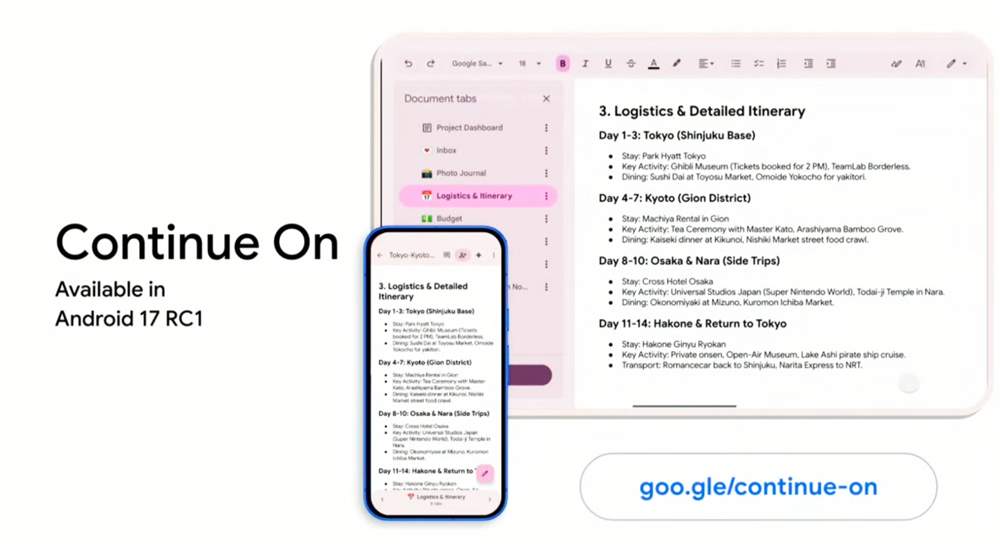
Android 17 also introduces Continue On, a handoff system designed to move an activity from one Android device to another. A recently used phone app can appear as a suggestion on a nearby tablet, allowing you to reopen the same activity with one tap and continue from where you stopped.
The system can move between native apps and can also fall back to a web page when the corresponding app is not installed on the receiving device. In practice, that could mean beginning a search, document, booking or shopping session on a phone and resuming it on a larger display without hunting for the same page again.
There is an important limitation: developers must add support to individual app activities. Continue On is therefore a platform capability rather than a universal switch that instantly works everywhere. Its value should grow as more apps adopt it.
Location Sharing Becomes Easier to See and Limit
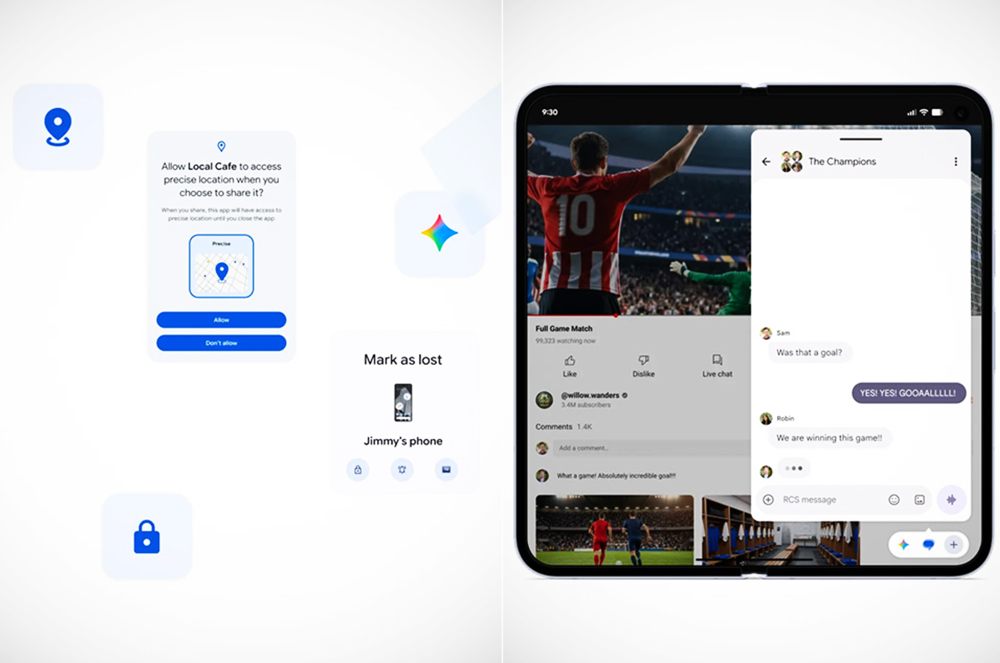
Android 17 makes location access more obvious. A persistent indicator appears whenever a non-system app is using location, much like the existing camera and microphone indicators. Tapping it opens a recent-use panel that identifies the apps involved and provides a direct route to their permission controls.
A new system location button also allows participating apps to request precise location for the current session only. Instead of granting continuing access simply to tag a post or find a nearby business, you can share your position at the moment it is needed and let that access end with the session.
The permission dialog now distinguishes Precise and Approximate location more clearly. Approximate location is also calculated using population density rather than a fixed two-kilometre grid. In sparsely populated areas, Android can use a broader area so an approximate position does not inadvertently become rather precise.
Apps No Longer Need Your Entire Address Book
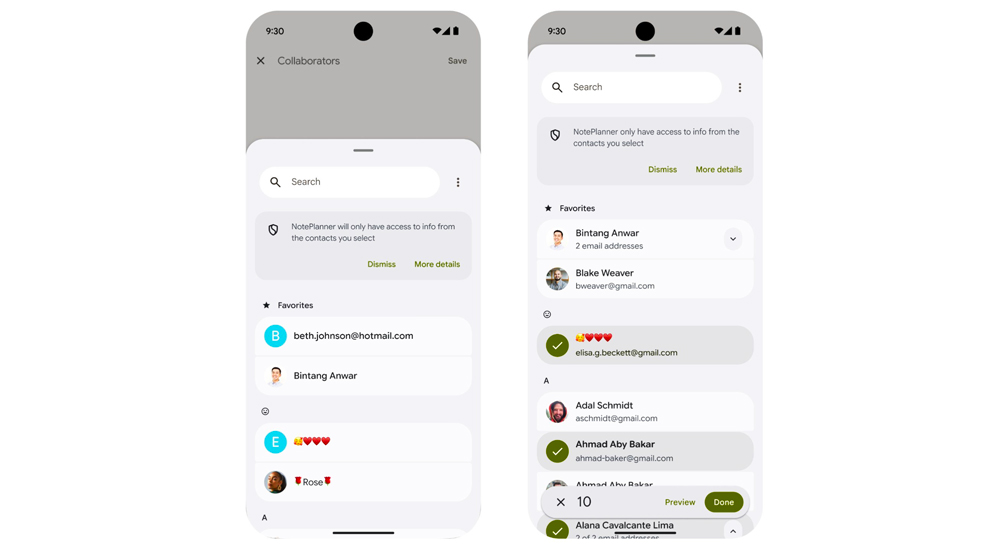
The new system Contact Picker applies the same selective approach to contacts. An app can ask for only the fields it needs, such as a phone number or email address, and you choose the specific people to share. The app receives temporary access to that selected information rather than broad permission to read the full address book.
This is the sort of privacy improvement that also makes a phone easier to use. The choice is presented at the moment it matters, the interface is consistent across apps, and users do not have to decide between surrendering every contact or abandoning the feature entirely. Adoption still depends on developers replacing older, broader permission requests.
Stronger Protection Is Available in One Setting
Android Advanced Protection Mode gives users an opt-in security profile controlled through a single setting. When enabled, it blocks installation from unknown sources, restricts USB data connections and requires Google Play Protect scanning. It is especially relevant to people at elevated risk of targeted attacks, but it also gives any user a straightforward way to harden a device without adjusting several separate controls.
Android 17 also tightens access to SMS one-time passwords. For apps covered by the new rules, protected OTP messages are withheld for three hours rather than being immediately exposed through general SMS access, reducing the opportunity for a malicious app to capture a login code. Legitimate apps can use Android’s dedicated verification mechanisms instead of requesting broad SMS access.
Apps targeting Android 17 must also request permission before communicating broadly with devices on the local network. That adds a clearer boundary around smart-home products, casting receivers and other connected equipment. Passwords entered with a physical keyboard receive another quiet safeguard: the last typed character is no longer revealed by default.
Live Information Becomes More Useful at a Glance
Android 17 expands the tools behind Live Updates, the prominent ongoing notifications used for journeys, deliveries, timers and similar activities. A new MetricStyle template supports information such as fitness measurements, travel data, timers and stopwatches, while semantic colours let apps identify information as safe, cautionary or dangerous.
These changes should make supported notifications easier to scan without opening the app. A live activity can present the number that matters and use consistent visual language when something needs attention. As with many Android 17 additions, the improvement appears only after apps update to use the new system templates.
Assistant and Hearing-Aid Audio Gain Better Controls
Assistant audio now has a dedicated volume stream, separating it from ordinary media. That makes it possible to mute a video while keeping an assistant audible—or lower an overly enthusiastic assistant without also making music quieter. Assistant apps must use the new audio support, but the platform finally provides the control users have long expected.
Android 17 also improves Bluetooth LE Audio hearing-aid support. Users can independently decide whether notifications, ringtones and alarms play through connected hearing aids or the phone’s speaker. It is a small menu choice with a substantial everyday benefit, particularly for anyone who wants to remain connected without every alert arriving directly in the ear.
Camera Improvements Depend on the Phone in Your Hand
Android 17 adds support for RAW14 capture on compatible sensors, vendor-defined camera extensions, Eclipsa HDR video, improved low-bandwidth voice encoding and optional H.266 video support. These are meaningful platform upgrades, especially for camera and editing apps, but they are not universal features that every Android 17 phone automatically receives.
Hardware compatibility, manufacturer implementation and app support all matter. The real benefit is that third-party apps have better ways to reach advanced camera modes and modern media formats without relying on fragmented workarounds. Users will experience the results gradually as devices and apps take advantage of them.
Foldables and Tablets Get Fewer Awkward Apps

For apps targeting Android 17, developers can no longer opt out of resizability, orientation changes or normal aspect-ratio behaviour on large screens. Android will ignore the older restrictions on tablets, foldables and compatible desktop-style displays, although games remain exempt.
This does not instantly redesign every poorly adapted app. It does, however, remove several excuses that allowed phone-sized layouts to remain locked into narrow windows or the wrong orientation. Over time, more apps should behave like flexible windows rather than oversized phone screens.
The Best Performance Feature Is the One You Do Not Notice
Android 17 includes a Memory Limiter that prevents one app from consuming a disproportionate share of a device’s RAM. It can reclaim memory from an excessive process, temporarily throttle it and, in extreme cases, terminate an app with an uncontrolled memory leak before it destabilizes the rest of the system.
Well-behaved apps should continue normally. The user-facing benefit is indirect: fewer cases in which one runaway app causes wider interface stutters, battery drain or the premature closing of other apps. It is not glamorous, but neither is a phone freezing while you try to pay for coffee.
The AI Transformation Has Not Fully Arrived Yet
Google describes Android 17 as the beginning of a shift toward an intelligence system. Its AppFunctions framework is intended to let assistants carry out supported actions inside apps, using the app’s own functions and local state. The concept could eventually make assistants far more useful than a layer floating above the operating system.
For now, however, AppFunctions integration with Gemini remains in private preview. It is an important direction for developers, not a reason for ordinary users to upgrade today. Android 17’s real strengths are the features already grounded in daily use: faster multitasking, more selective sharing, clearer controls and better movement between screens.
The Rollout Reality
Android 17 is available on most supported Pixel devices, while availability on other brands depends on each manufacturer’s update schedule and interface. Even after the operating-system update arrives, several features require apps to target Android 17 or adopt its new APIs. The experience will therefore improve in stages rather than appearing all at once.
That gradual rollout does not make the update insignificant. It simply reflects how Android now evolves: Google builds the foundation, manufacturers adapt it and app developers determine how much of it users actually see.
Final Byte

Android 17 is not a reinvention of the smartphone, and that may be its greatest strength. App Bubbles make multitasking quicker, Continue On reduces friction between devices, and the new privacy controls replace broad permissions with more deliberate choices. Add better audio routing, stronger security and firmer rules for large-screen apps, and the result is an update focused on how people actually use their phones—not how impressive a feature list looks on launch day.