Android’s September 2026 Drop is less about reinventing the smartphone and more about removing small, familiar frustrations. Google is extending Find Hub beyond tracked devices, introducing a tool designed to reduce motion sickness, expanding Gemini Live’s accessibility capabilities and making Google Messages more useful for planning and personalization.
Unlike a Pixel Drop, these additions are intended for the wider Android ecosystem. Availability still varies by Android version, device, country and app rollout, so the entire package may not appear at once. Two of the features are also officially listed as coming soon rather than immediately available. Here are the five upgrades worth watching for.
1. Find Hub Remembers Where You Put Things
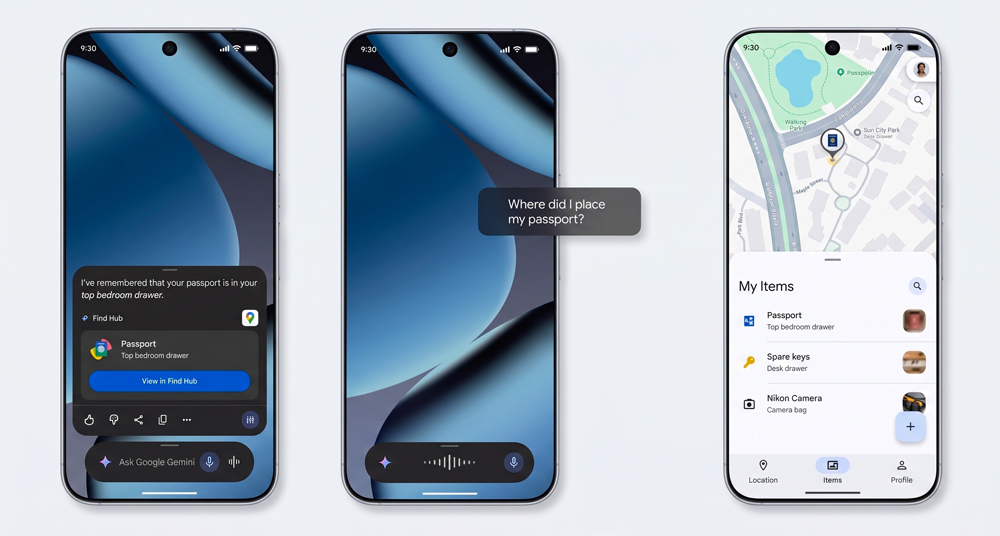
Find Hub has traditionally helped locate phones, earbuds and belongings fitted with compatible tracker tags. Its new Remembered Items feature expands that role to objects without any connected hardware.
Users will be able to tell Gemini where something has been stored, optionally add a photo and have the location saved inside Find Hub. A passport placed in a bedroom drawer, spare keys hidden in a cupboard or documents stored before a trip can all be recorded with a simple voice request. When the item is needed, its location can be retrieved by asking Gemini or opening the Remembered Items tab.
It does not physically track an object or know if someone moves it later. Think of it as a searchable digital memory rather than a replacement for a Bluetooth tracker. That distinction matters, but it could still prevent the classic pre-airport ritual of turning the house upside down.
Remembered Items is coming soon to devices running Android 16 or later in countries and languages where both Gemini and Find Hub are supported.
2. Motion Assist Makes Passenger-Side Screen Time Easier
Reading, watching videos or answering messages in a moving vehicle can create a conflict between what the eyes see and what the body feels. For some passengers, the result is motion sickness.
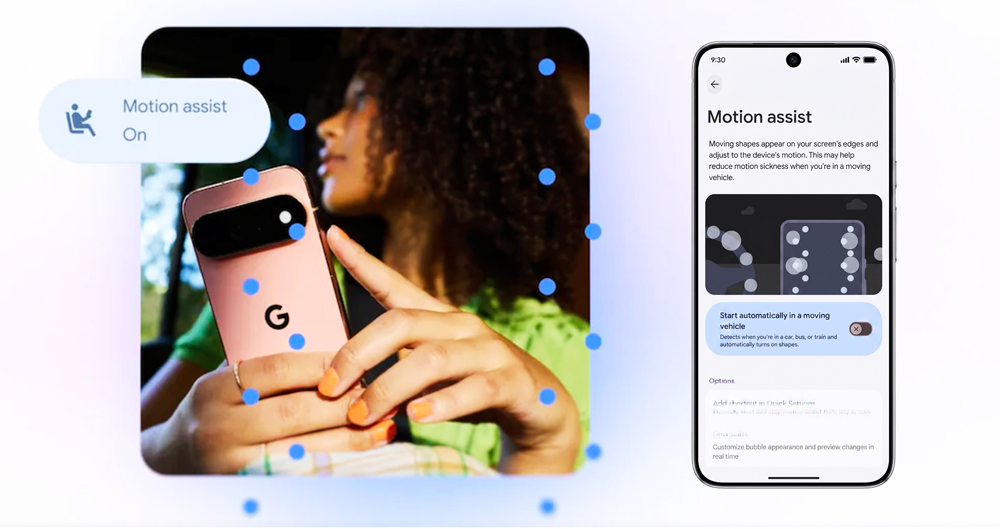
Motion Assist attempts to reduce that discomfort by placing subtle animated bubbles over the screen. The bubbles respond to the vehicle’s movement, providing a visual reference that more closely matches the motion detected by the inner ear. The underlying app remains usable while the overlay is active.
Android can switch the feature on automatically when it detects travel in a car, bus or train. It can also be activated manually through a Quick Settings tile. Users can adjust the bubbles’ shape, colour and opacity, allowing the visual effect to remain noticeable without taking over the display.
Motion Assist is available on phones running Android 17. It is designed to help reduce motion sickness, not guarantee its prevention, and passengers should stop looking at the screen if symptoms continue. Drivers, meanwhile, should leave the reading to someone else.
3. Guided Vision Gives Gemini Live a More Practical Eye
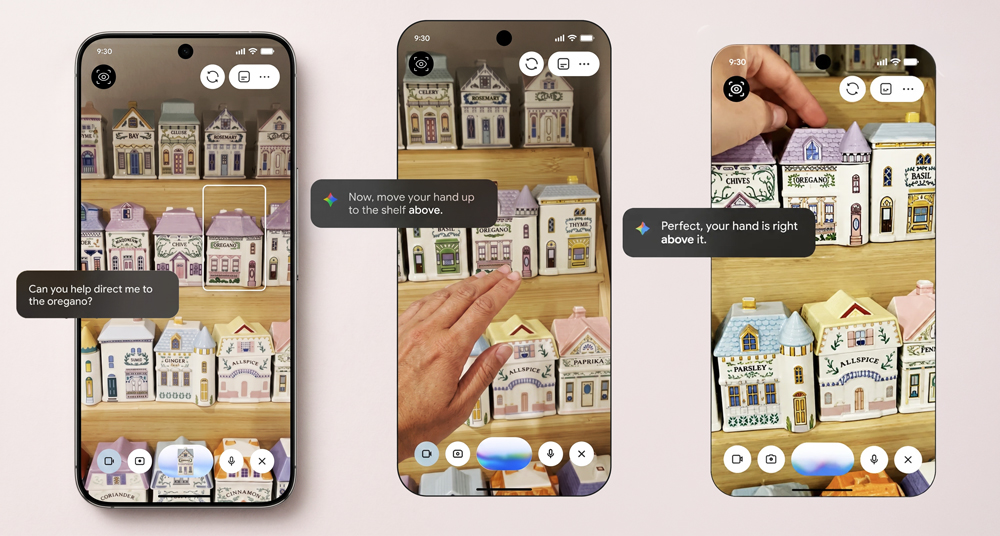
Guided Vision turns Gemini Live into a camera-based assistant that can describe what is in front of the user. Developed for and with blind and low-vision communities, it is one of the Drop’s most meaningful additions.
A user can share the phone’s camera with Gemini Live and receive spoken assistance while reading fine print, examining a menu in a dim restaurant or identifying an object around the home. If the camera is pointed in the wrong direction, Guided Vision can provide instructions to reframe the image, pan across an area or centre the relevant object.
The importance of the feature is not simply that Gemini can interpret a camera feed. It can also help the user position the camera well enough to obtain a useful answer—often the difficult part of visual-assistance tools.
Guided Vision will be accessible through Android’s accessibility shortcuts, the TalkBack menu or Gemini’s settings. Google says it is coming soon to phones running Android 9 or later in countries where Gemini is available. As with any camera-based AI system, users should verify critical details such as medication instructions, allergens and safety information through another reliable method.
4. Google Keep Moves Into Google Messages
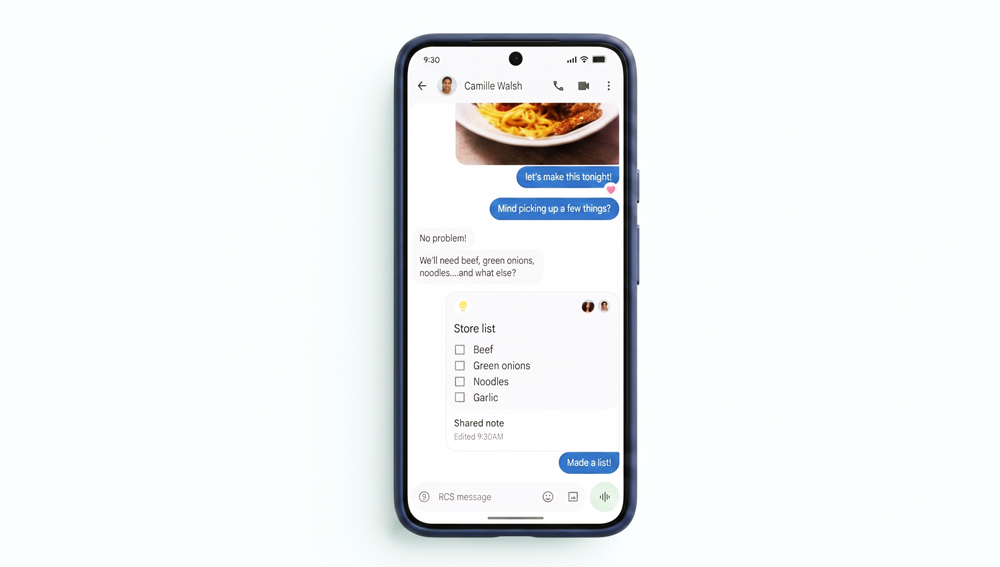
Google Messages is becoming more practical for the conversations that quietly turn into planning sessions. Through its new Google Keep integration, people can create and edit shared notes without leaving a chat.
Tapping the plus icon in a conversation brings up the option to use Google Keep. Participants can then contribute to a grocery list, collect holiday ideas, coordinate an event or maintain a shared checklist. The completed note appears within the conversation, while everyone included can view, edit and add information.
This is a modest change with considerable everyday value. Plans are often scattered across several messages, screenshots and separate apps, forcing someone to assemble the final details manually. A collaborative note gives the conversation one current version of the plan.
The Google Keep integration began rolling out with the September Drop, although it may take time to appear on every supported device.
5. Chat Themes Give Every Conversation Its Own Look
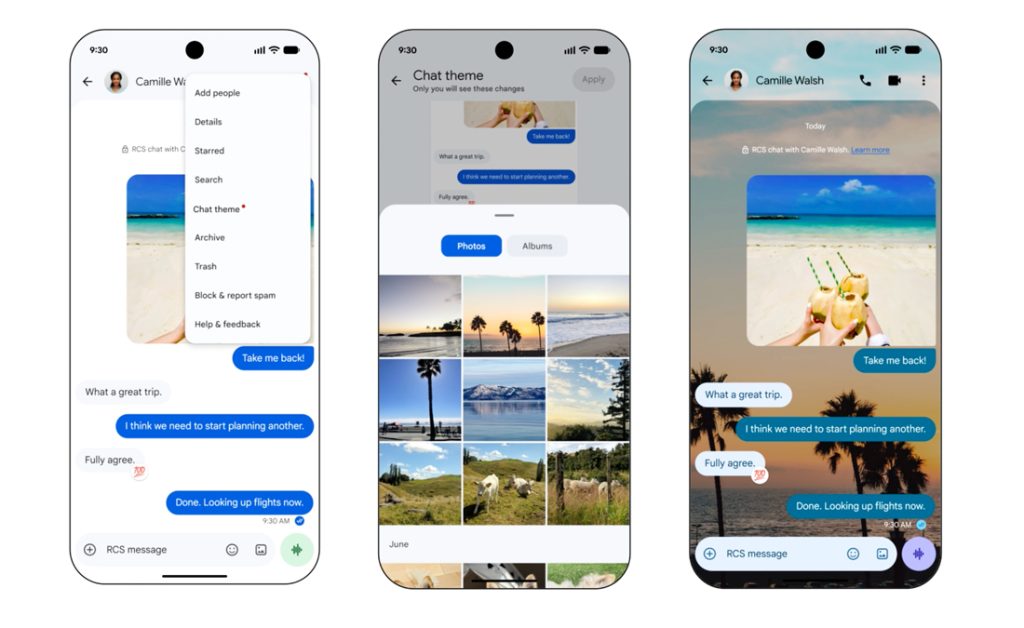
Google Messages now allows users to assign individual backgrounds and colour combinations to different conversations. A theme can use a supplied wallpaper or a personal photo, with the message bubbles automatically adapting to the selected image. Their colours can also be adjusted manually.
The feature is mostly cosmetic, but it has a practical side. Visually distinct conversations can make it easier to recognize a family chat, travel group or work thread before sending a message. That may save someone from delivering weekend plans to the office group—a small victory for both productivity and dignity.
Themes are applied to the user’s own view of the conversation, allowing personal customization without redesigning everyone else’s inbox. Chat Themes are available now in Google Messages, though the rollout may still vary between devices and regions.
A Drop Built Around Everyday Friction
The September release illustrates how Android Drops differ from major operating-system upgrades. Instead of tying every improvement to a single new version, Google is distributing features through Android, Gemini, Find Hub and Google Messages. That broader approach can bring some additions to older devices, but it also produces a complicated availability map.
Motion Assist requires Android 17, while Find Hub’s Remembered Items needs Android 16 or later. Guided Vision reaches back to Android 9 but remains dependent on Gemini’s regional availability. The two Messages features are app-based, making them potentially accessible across a much wider selection of Android phones.
Users should update Android, Google Play system components and the relevant Google apps, then allow time for server-side rollouts. If a feature is missing immediately after updating, the phone is not necessarily the problem. Sometimes the newest Android feature is patience.
Final Byte
Android’s September Drop succeeds because its strongest ideas solve recognizable problems. Find Hub becomes a memory aid, Motion Assist addresses passenger discomfort, Guided Vision expands access to visual information and Google Messages gains better tools for planning and personalization.
Not every feature will matter to every user, and two are still on the way. Yet the overall release shows Android becoming more useful through focused improvements rather than flashy reinvention. The best place to begin is Google Messages, where Chat Themes are available now and Keep integration is rolling out. Android 17 users should also test Motion Assist on their next passenger journey, while everyone else can keep an eye out for Find Hub’s Remembered Items and Gemini Live’s Guided Vision.